您现在的位置是:首页 > 经验记录>服务器相关>linux(ubuntu18.04)虚拟机目录挂载映射到windows目录 网站首页 服务器相关
linux(ubuntu18.04)虚拟机目录挂载映射到windows目录
1,在vmware中设置windows共享目录 F:\html
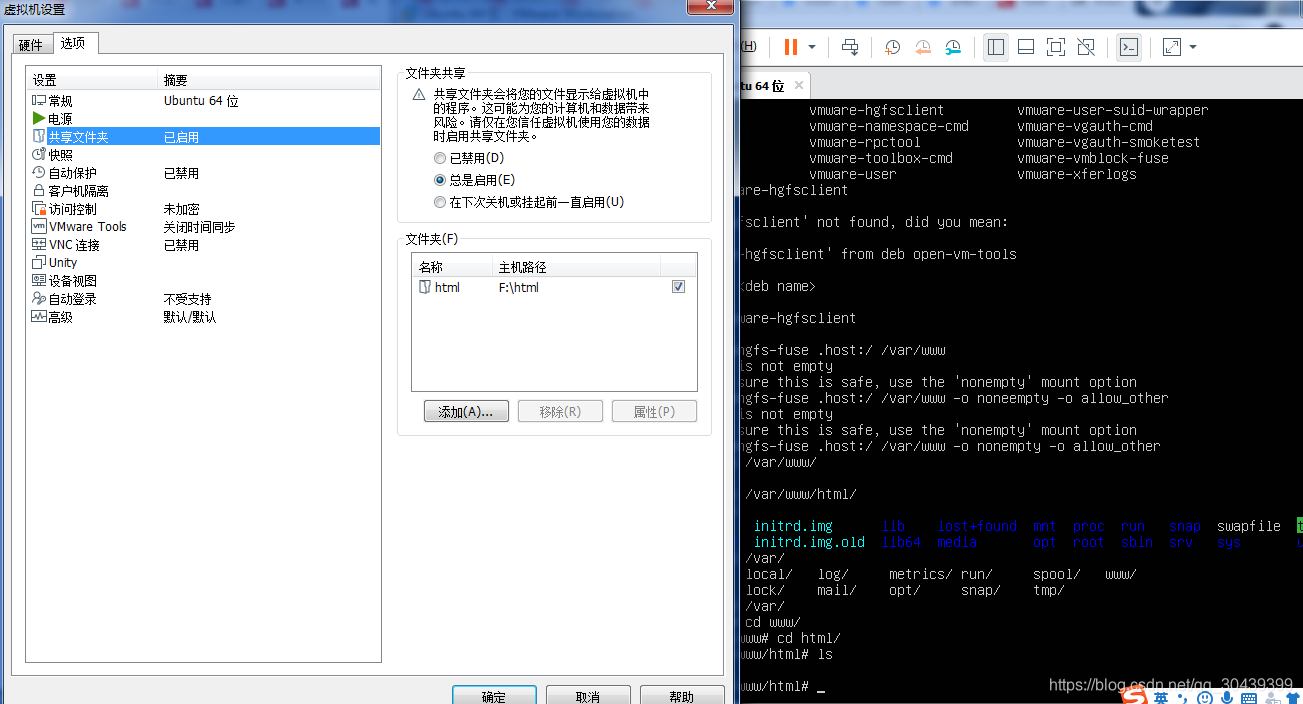
2,在ubuntu中安装open-vm-tools
apt-get install open-vm-tools open-vm-tools-desktop
3,在ubuntu中用vmtools挂载共享目录
[root@ubuntu~]# vmware-hgfsclient //查看共享的目录
html
[root@ubuntu~]#
vmhgfs-fuse .host:/ /var/www -o nonempty -o allow_other
挂载目录
[root@ubuntu~]# ls /var/www/
html
[root@fedora ~]# ls /var/www/html
4,上面的设置让F:\html = /var/www/html;
5,在windows F:\html 新增文件, /var/www/html会出现
备注:
我用mount挂载行不通,一直报错:Error: cannot mount filesystem: No such device
这里安装一下:sudo apt-get install open-vm-tools-dkms
然后命令:sudo vmhgfs-fuse .host:/ /mnt/hgfs -o allow_other
记住,一定要加allow_other选项,不然之后的hgfs文件普通用户不能访问
如果之前没有加-o allow_other,已经使得文件hgfs在普通用户环境下不可访问,也就是提示了
fuse: mountpoint is not empty
fuse: if you are sure this is safe, use the ‘nonempty’ mount option
可将nonempty选项加到里面去
sudo vmhgfs-fuse .host:/ /mnt/hgfs -o nonempty -o allow_other
随机推荐
- X-editable使用文档
- CentOS8 yum 报错 404 for http://mirrors.cloud.aliyuncs.com/centos/8/AppStream
- 各网盘使用油猴进行链接读取的操作方式
- Ubuntu上安装和配置Supervisor及运行pkg_resources.DistributionNotFound:报错处理
- git打标签及推送标签相关操作
- 在阿里云ECS服务器Ubuntu16.04LTS上部署apache2+php+mysql环境
- Laravel框架下,页面(包含大量echarts图表)html导出为PDF实现,可批量.
- Ubuntu18.04 lnmp nginx1.14 PHP7.2 MySQL5.7 安装 配置
- laravel上线都要注意什么?
- 安装swoole(cgywin环境)及laravel运行